Phishing: how to spot a fake email or text message
An email or text message can look as if it comes from your bank, your mobile operator or a service you use every day. Here are the signs that help you spot a phishing attempt before you click on the wrong link.
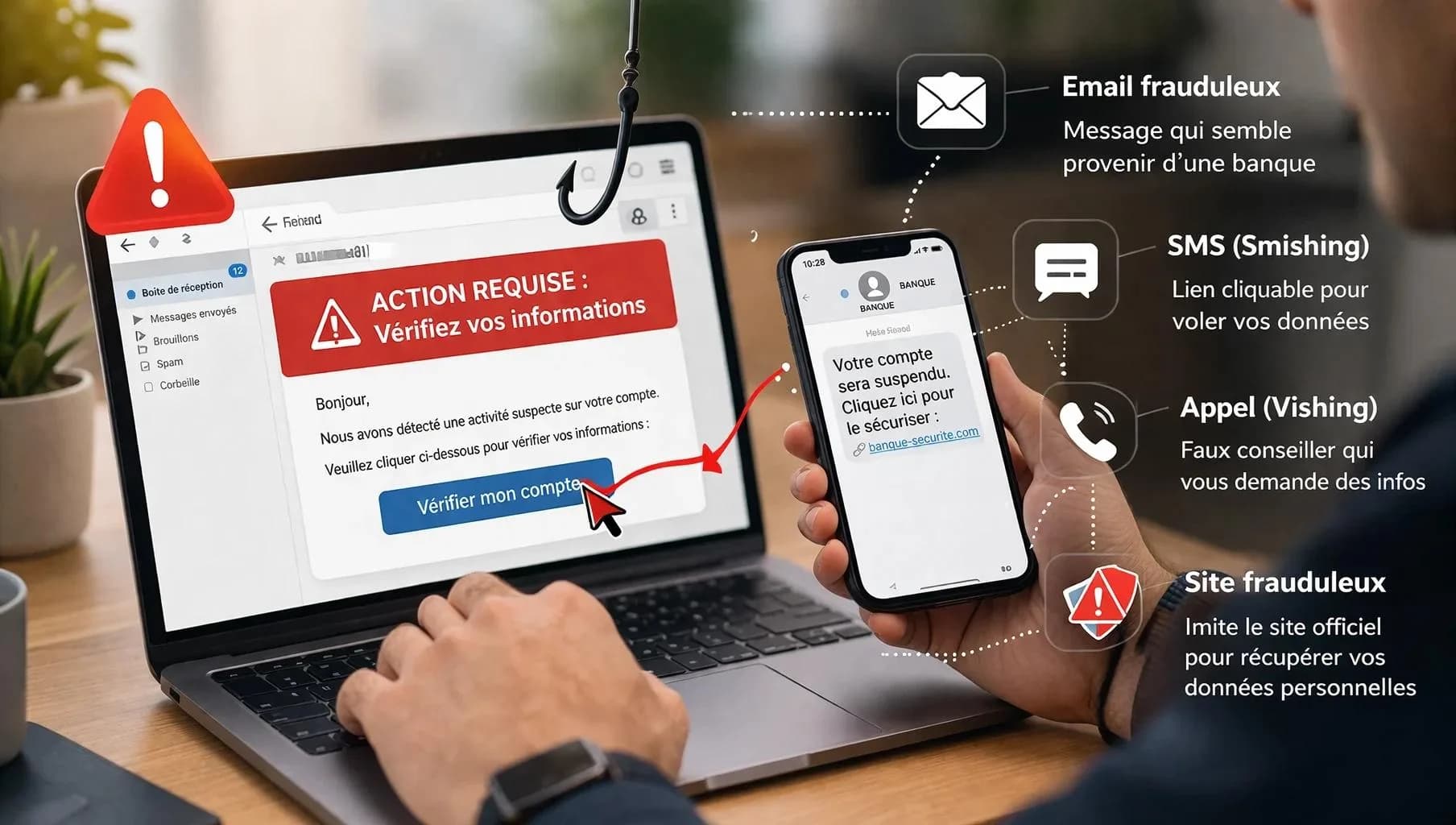
- A message asking you to click a link quickly, confirm your account or share a code may be a phishing attempt. Cybercriminals pose as a bank, a phone operator, a delivery service or a government agency.
Phishing is a technique cybercriminals use to deceive people by posing as someone they trust. The message can arrive by email, text message, instant messaging or even by phone. The goal is usually simple: to push you into taking an action.
For example: - clicking on a link; - entering your password; - sharing a code received by text message; - providing your bank details; - downloading an attachment; - installing an app; - making a payment.
According to Cybermalveillance.gouv.fr, the French government’s cybercrime assistance service, phishing involves impersonating a trusted third party in order to get the victim to hand over personal or banking data. The phenomenon remains very significant. In its report published in 2026 on the threats observed in 2025, Cybermalveillance.gouv.fr says phishing accounted for a third of all requests for assistance across all types of users.
First warning sign: the message creates a sense of urgency
This is probably one of the most widely used techniques. The message pushes you to act immediately: “Your account will be suspended in 24 hours.” “Your payment failed. Click here to fix it.” “Your parcel is on hold. Confirm your address.” “Suspicious activity detected. Check your account now.” The aim is to stop you from taking the time to think. The US Federal Trade Commission advises people to be wary of messages that tell a story designed to get the victim to click a link or open an attachment. The simple rule The more pressure a message puts on you, the more you should slow down. A genuine company may ask you to do something, but that does not mean you have to use the link in the message.
Check the sender’s address
The sender’s display name can be misleading A message may show: “Microsoft Support” while the real address is completely different. For example: support-microsoft123@gmail.com or an address with a strange domain. Cybermalveillance.gouv.fr recommends carefully checking the sender’s address, especially when it looks unusual or does not match the organisation the message supposedly comes from.
Be careful An address that looks right is no guarantee that the message is genuine either. Spoofing techniques are becoming more and more sophisticated. You should therefore never treat a single clue as absolute proof.
Don’t click on links straight away
This is one of the most important reflexes. A link can display www.my-bank.com but redirect to another site. Before clicking, check where the link leads. On a computer, simply hover the cursor over it without clicking. On a smartphone, be even more careful: the interface can make it harder to check the address.
The best method? If your bank, your operator or an online service asks you to log in: don’t use the link in the message. Open the official app directly, or type the site’s address into your browser yourself. It takes slightly longer. But in cybersecurity, a few seconds of caution can save hours of trying to recover an account.
Spelling mistakes are no longer enough
For a long time, spelling mistakes were seen as an obvious sign of phishing. That is still sometimes the case. But it is no longer a reliable rule. Modern campaigns can be perfectly written and have a layout very close to that of a real company. Cybermalveillance.gouv.fr points out that phishing attempts are now better and better made.
You therefore need to look at the message as a whole: - who is sending it? - why are they contacting you? - does the message match something you have actually done? - does the link lead to the right domain? - are you being asked for unusual information? - is the message trying to make you act in a hurry?
Phishing by text message: “smishing”
Phishing is not limited to email. When it comes by text message, it is often called smishing, a blend of SMS and phishing. The scenario is usually very simple: “Your parcel could not be delivered.” “Your subscription is about to expire.” “Your bank account needs to be verified.” “You have received a payment. Click here to confirm it.” Cybermalveillance.gouv.fr has seen a sharp rise in text message phishing for several years. The danger is heightened by the fact that we often trust a text message more than an email. The right reflex If a text message asks you to click a link to carry out a sensitive operation: don’t click. Open the official app or website of the service concerned directly.
Watch out for verification codes
A particularly dangerous trap is designed to obtain not only your password but also your verification code. Imagine this: You receive a message: “A login attempt has been detected. Confirm your identity.” You enter your password on a fake page. A few seconds later, you receive a code by text message. The fake site asks you for this code. If you give it, you may be handing the attacker the last piece they need to get into your account. Key point A code received by text message or generated by an authenticator app is confidential. Don’t give it to anyone just because they claim to work for your bank, your operator or an IT department.
Attachments can be dangerous too
Phishing does not always involve a link. An email may contain an attachment: - PDF; - Word document; - Excel file; - ZIP archive; - executable program. An unexpected attachment should therefore be handled with care. This is especially true when the message claims to come from a supplier, a colleague or an administrative department and you were not expecting any document.
What should you do if you have clicked?
Don’t panic. Clicking on a link does not automatically mean that your device or account has been compromised. The situation becomes particularly worrying if you have: - entered your password; - shared a code; - provided your bank details; - downloaded and run a file; - installed an app; - authorised an unusual login. If you gave away your password Change it immediately from the real website or the official app. If you used that password on other services, change it on those accounts too. Then turn on two-factor authentication (2FA) wherever the service offers it. If you gave away banking information Contact your bank quickly through its official channel. Don’t necessarily call back the number given in the fraudulent message.
Conclusion: if in doubt, don’t click
Phishing does not rely on technology alone. Above all, it exploits trust, fear, curiosity and urgency. A message can look perfectly professional and still be fraudulent. The best defence therefore remains a simple reflex: take a few seconds to check before you act. As Cybermalveillance.gouv.fr points out, when a message seems suspicious, it is better to contact the sender through another channel to check that it is genuine. On the internet, speed is convenient. But when it comes to security, taking your time is sometimes the best protection.
- FTC – Federal Trade Commission, TC.
- Cybermalveillance.gouv.fr, Cyberdefense.
Spotted an error? Write to infos@novotech.blog. Corrections are flagged at the end of the article.